Essential cookies enable core functionality. The website cannot function properly without these cookies, and they can only be disabled by changing your browser preferences.
Advertisement cookies are used to provide visitors with relevant ads and marketing campaigns. These cookies track visitors across websites and collect information to provide customized ads.
Used to identify individual clients behind a shared IP address and apply security settings on a per-client basis.
By selecting “Accept all” you allow QualityHive and our partners to use cookies and to share your data for all these purposes.
We and our partners use cookies and similar tools to measure our site's audience, evaluate the performance of our ads, and show you personalized content and ads.
Except for cookies that are essential for navigating our site, we use these cookies and share your data only with your consent.
Automate client feedback with our MCP serverLearn more!
To stop endless website revisions, define what a round is in your contract, take each round as one consolidated list from one person, count the rounds where the client can see them, and price anything outside them. Endless revisions usually start because nobody defined a round, so the client reasonably assumes changes are open-ended.
What a revision round actually is
A revision round is one consolidated set of changes to one version of the work, sent by one named person within an agreed window and actioned together. Take away any of those parts and changes can keep arriving for as long as anyone keeps looking.
Rounds only work if you also separate them from defects and new work. These examples use a fictional online coffee shop.
Type
The test
Example
Uses a round?
Who pays?
Defect
It does not do what was agreed
The basket total ignores a valid discount code
No
Agency
Revision
It works as agreed, and the client wants it adjusted
Swap the order of two homepage sections
Yes
Included
New work
It changes what was agreed
Add a loyalty scheme
No, it is quoted separately
Client
This split depends on having a written scope to test against. If yours is thin, start with a proper website requirements document. Never let bugs use up a client's rounds. They will feel short-changed, and they will be right.
How many rounds to include
There is no standard number. These are sensible starting points for a small to medium project, so adjust them to your budget and to how much the client wants to be involved.
Stage
Rounds
Client review window
Agency turnaround
Wireframes
1
3 working days
2 working days
Homepage design
2
5 working days
3 working days
Inner page designs
1
5 working days
3 working days
Built site on staging
2
5 working days
5 working days
Final content check
1
3 working days
2 working days
Put every review window into your website project plan, so the client can book the time before the work arrives. A client who only hears about a review on the day it starts is far more likely to go quiet.
Contract wording you can adapt
This wording is a starting point and is not legal advice. Have a solicitor check it before you use it, particularly the late feedback section, and tell them if your client is a consumer rather than a business.
REVISIONS AND APPROVALS1. Included revisions. The Fee includes [2] Rounds at each of these stages: [Design] and [Build].2. Meaning of Round. A "Round" is one consolidated list of requested changes to one version of a Deliverable, submitted by the Client Contact through [the agreed feedback tool or email address] within the Review Period. The Agency will action the listed changes together.3. Review Period. The Client Contact will submit each Round within [5] working days of the Agency confirming that a version is ready for review (the "Review Period").4. Client Contact. The Client appoints [name and job title] as the "Client Contact". The Client Contact has authority to give feedback, resolve conflicting comments and approve Deliverables, and the Agency may rely on their instructions. The Client may replace the Client Contact by written notice.5. Defects. Work needed to make a Deliverable meet the agreed Specification is not a Round and is included in the Fee.6. Additional Work. The following are "Additional Work": changes requested after all included Rounds have been used, changes to a Deliverable that has already been approved, and changes outside the agreed Specification. The Agency will quote for Additional Work in writing at [hourly rate or fixed price], and will start it only after the Client Contact accepts the quote in writing. The Agency may adjust the timetable to reflect Additional Work.7. Approval. A Deliverable is approved when the Client Contact confirms approval in writing, by email or through [the agreed feedback tool].8. Late feedback. If no Round is submitted within the Review Period, the Agency may treat that Round as used and may reschedule the remaining work to its next available date. [Optional: If the Client Contact has not responded within [10] working days of a written reminder, the Deliverable will be treated as approved.]
Walk the client through this clause at kick-off rather than leaving them to find it. A two-minute explanation now is much easier than pointing at the contract in week eight.
Save countless hours on your projects
Raise tasks in under 3 seconds using our revolutionary widget
A lot of the cost of a messy round is in turning scattered comments into a list you can work from. Do that once, at the start.
Open the round in writing. Say what is being reviewed, the closing date and who sends the feedback. These website feedback email templates cover this and the chasers.
Give comments one home. Email threads make it hard to count items or see which version someone was looking at. A client feedback tool keeps each comment attached to the page it is about. A shared spreadsheet also works if it is kept up to date.
Resolve conflicts before work starts. If two reviewers disagree, the Client Contact decides. Your team should never pick a side.
Sort every item into defect, revision or new work. Tell the client how you have sorted them, so any disagreement happens now.
Close the round in writing. List what will be done. Anything that arrives afterwards waits for the next round.
Track rounds where the client can see them
A round count that only exists in your head will not hold up in a difficult conversation. Copy this tracker and send the latest version with every round-closing email. The figures are made up.
Round
Version reviewed
Review window
Defects
Revisions
New work
Rounds left
Build 1
Staging, 16 Nov
16 to 20 Nov
9
14
1
1 of 2
Build 2
Staging, 27 Nov
27 Nov to 2 Dec
3
8
0
0 of 2
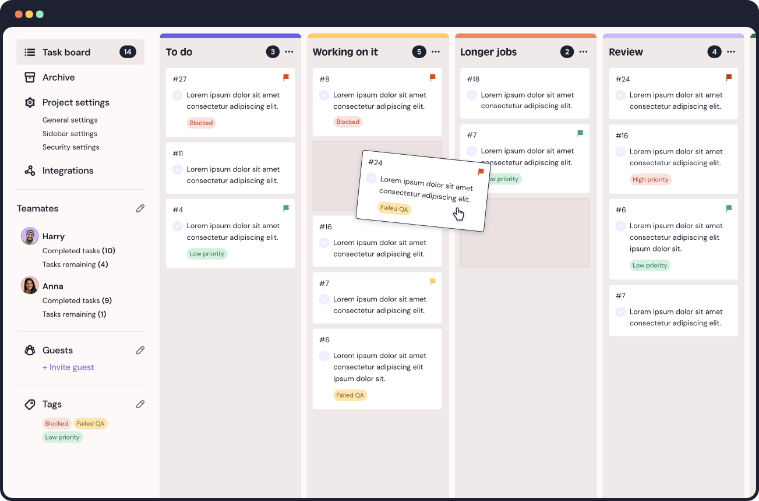
On your task board, give each round its own column or label so you can see what belonged to which round. In QualityHive, tasks land on a Kanban board with filtering, and the Mega plan adds an Excel export if you want a record to send the client. A spreadsheet does the same job on a small project.
The line that matters most is "rounds left". A limit is much easier to accept when the client has been reminded of it at every step.
Handling scope creep calmly
Run each new request through three questions, in this order.
Does the site fail to do what the specification says? If so, it is a defect.
Is the change within the agreed pages and functions? If so, it is a revision.
If neither, it is new work.
New work has four honest answers: quote it and add it now, move it to a second phase, swap it for something of similar size, or decline it. Avoid "leave it with me", which clients hear as yes.
If you decide to do a small extra for free, log it with "no charge" beside it. The client sees the value, and it does not quietly become the new normal.
What the client says
What is happening
What to do
"While you're in there, could you..."
A small addition that may be new work
Log it and assess it like anything else
"Our MD has just seen it"
A new stakeholder after approval
Ask the Client Contact to consolidate their comments, and treat changes to approved work as Additional Work
"Can we go back to the first version?"
Reopening an earlier decision
Use a round if one is left, otherwise quote
"One more small thing"
Late feedback after a round closed
Add it to the next round or the post-launch list
"It's only a small change"
The size is unknown
Check it first, then give an estimate
When it goes wrong
The rounds have run out, but there are real problems. Defects never counted, so fix them. If the problem is the design direction, have a call before you offer another paid round, because more rounds will not fix a brief that was wrong.
The client disputes the count. Show the tracker. If you did not keep one, absorb this round and start tracking now.
Your team caused the extra round. If you misread the brief or shipped something broken, that round does not count. Say so in writing, which also makes your count more credible next time.
The client has gone silent. Follow your clause, send the final chase and pause the project in writing.
Rounds keep being used on the same question. Often this means the original design brief never settled it, so stop iterating and get a decision on a call.
Revolutionise your QA processes
Frequently asked questions
How many revision rounds should a website project include?
There is no fixed rule. Two rounds on design and two on the built site is a reasonable starting point for a small to medium project. A complex build or a large stakeholder group may justify more, and it should be reflected in the price.
Are bug fixes included in revision rounds?
No. If the site does not do what was agreed, fixing it is part of delivering the project. Rounds are for changes to work that functions as agreed.
Should I charge for extra revision rounds?
Yes, if the client has used the rounds in the contract. Agree the price before you start and confirm it in writing. A fixed price per extra round is simpler for both sides than a running hourly total.
What should I do if a client keeps sending feedback after the round has closed?
Acknowledge it, tell them which round it will go into and add it to your tracker. Doing it straight away teaches the client that deadlines are optional.