Essential cookies enable core functionality. The website cannot function properly without these cookies, and they can only be disabled by changing your browser preferences.
Advertisement cookies are used to provide visitors with relevant ads and marketing campaigns. These cookies track visitors across websites and collect information to provide customized ads.
Used to identify individual clients behind a shared IP address and apply security settings on a per-client basis.
By selecting “Accept all” you allow QualityHive and our partners to use cookies and to share your data for all these purposes.
We and our partners use cookies and similar tools to measure our site's audience, evaluate the performance of our ads, and show you personalized content and ads.
Except for cookies that are essential for navigating our site, we use these cookies and share your data only with your consent.
Automate client feedback with our MCP serverLearn more!
The best bug tracking tool depends on who reports your bugs and where the fix happens. If developers log their own bugs, start with Jira, Linear or GitHub Issues. If clients and testers report them from a live website, look at a visual tool such as BugHerd, Marker.io or QualityHive.
QualityHive is our own product, so weigh that entry accordingly. Everything else here was checked on the vendor's own website, and all prices are at the time of writing (November 2026). Plans change, so confirm on the pricing page before you commit.
Bug tracking tools compared
Tool
Type
Free option
Paid pricing (November 2026)
Better choice when
Jira
Issue tracker
Free for up to 10 users, 2 GB storage
Standard listed at $8.48 per user per month, Premium at $15.56
You need configurable workflows and reporting
Linear
Issue tracker
Free: unlimited members, 250 issues, 2 teams
Basic $10 and Business $16 per user per month, billed yearly
A product team plans in cycles
GitHub Issues
Code-based tracker
Free with unlimited collaborators
Team $4 per user per month
Your code is on GitHub
GitLab Issues
Code-based tracker
Free: 5 users per private top-level group, 10 GiB
Premium $29 per user per month, billed annually
Your code and CI are on GitLab
YouTrack
Issue tracker
Free for up to 10 users
Cloud from $5.40 per user per month, or $4.50 billed annually
A small team wants flexibility at no cost
Bugzilla
Self-hosted, open source
Free under MPL 2.0
None, you pay for hosting
You have a sysadmin and want detailed fields
MantisBT
Self-hosted, open source
Free under GPL
MantisHub hosting from $27.50 per month paid annually (15 users)
You want a simple tracker on PHP hosting
BugHerd
Visual feedback
No free plan listed, free trial
Standard $50 per month, or $42 billed annually (5 members)
Clients report bugs and you need many integrations
Marker.io
Visual feedback
No free plan, 15-day trial with no card
Starter $59 per month, or $39 billed annually (3 members)
Reports must land straight in your developer tracker
QualityHive (ours)
Visual feedback
Free: 1 member, 1 project
Lite $18 per month (2 members, 5 projects)
You want visual reports on a board of their own
Trackers and visual tools solve different problems
An issue tracker is where work is managed: statuses, owners, sprints and reports. It assumes the person writing the ticket can describe the environment and the steps. A visual bug tool is about capturing the report: someone clicks on the page and the tool records what a developer needs.
Plenty of teams use one of each, with the visual tool feeding the tracker. Choose by asking which half of the problem is hurting you.
Issue trackers
Jira
Jira is Atlassian's tracker and is built around a workflow engine that gives a clear view of a bug's status, with custom fields, automation and reporting. The Free plan covers up to 10 users and 2 GB of storage, with Community support and 150 automation steps a month. Atlassian's calculator changes the per-user price by team size and billing cycle.
Pick Jira if your process has several sign-offs, you need custom statuses and you have someone to own the configuration. On a two-person project the setup can outweigh the benefit.
Linear
Linear describes itself as a system for modern product development, combining issue tracking with cycle planning. The Free plan has unlimited members but stops at 250 issues, 2 teams and 10MB file uploads.
Pick Linear if you are a product team that plans in cycles and wants an opinionated, quick tool. A bug-heavy project will reach the 250-issue cap, so budget for a paid plan.
GitHub Issues
GitHub Issues sits next to your code, and Projects adds table, board and roadmap views on top. The Free plan allows unlimited collaborators on public and private repositories. On free plans, attachments are capped at 10MB for images and videos and 25MB for other files.
Pick GitHub Issues if your code is there and the people reporting bugs are developers. Reporters need a GitHub account and access to the repository, which rarely suits clients.
GitLab Issues
GitLab includes issue tracking alongside repositories and CI. Its Free tier allows 5 users per top-level group on private projects, with 10 GiB of storage and 400 compute minutes a month.
Pick GitLab Issues if your pipelines already live there. A team larger than five on private projects will need Premium.
YouTrack
YouTrack is JetBrains' configurable project and issue tracker. It is free for teams of up to 10 users on Cloud, and the per-user rate falls as the team grows.
Pick YouTrack if you are ten people or fewer and want more configuration than a simple board offers without paying for it.
Save countless hours on your projects
Raise tasks in under 3 seconds using our revolutionary widget
Self-hosted trackers
Bugzilla
Bugzilla is free, open source under the Mozilla Public License 2.0 and on its 5.2 stable series. It needs Perl 5.14 or later, a database and a web server that can run CGI scripts.
Pick Bugzilla if you have someone to run it and you want detailed fields with no per-user fee. Expect a longer setup than any hosted tool here.
MantisBT
MantisBT is open source under the GPL and built on PHP, so it runs on ordinary PHP hosting. If you would rather not host it, MantisHub offers a managed version.
Pick MantisBT if you want a straightforward tracker on infrastructure you control.
BugHerd pins feedback to the element on the page, captures a screenshot and records browser, operating system and screen resolution, then routes everything to a Kanban board. Its plans include unlimited clients and projects, and Standard includes 10GB of storage.
Pick BugHerd if you want client feedback on a live site and need a long list of integrations, including project management and developer tools.
Marker.io
Marker.io adds a widget that attaches browser, OS, page and screen size to each report, can capture network logs and offers session replay. Its pricing includes unlimited guests and reporters. Starter has 3 team members and up to 10 projects, while Team is $199 per month, or $149 billed annually, with 15 members and up to 50 projects.
Pick Marker.io if developers want reports to arrive inside the tracker they already use. Its integrations cover the major trackers, with Jira on the Team plan. For teams who want bugs filed directly into a developer tool, this is a better fit than QualityHive.
QualityHive (our product)
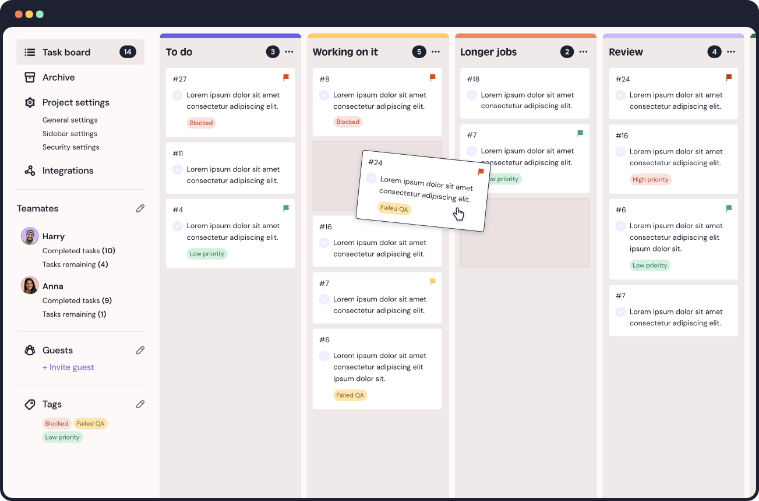
QualityHive is the tool we build. Add a small script to the site's head or use the Chrome, Firefox or Edge extension with no site changes. Someone clicks an element, types what is wrong and a task appears on a real-time Kanban board with a screenshot and the exact element pinned. It also records screen and voice video, and an MCP server lets AI assistants such as Claude read tasks with their full context.
The Free plan is one person and one project, with video, screenshots, annotations and the editor. Guest feedback and browser details start at Lite. Every new account gets 14 days on Mega with no card, then moves to Free automatically.
Pick QualityHive if you want visual reports from clients and testers on a board of their own. Its direct integrations are Trello and Monday.com only, with webhooks on Mega and an API on Colossal for anything else. If your bugs have to live in another tracker, or you need custom workflow states and sprint reports, one of the tools above will serve you better. You can read more on our visual bug reporting page or start free.
Pick this if...
Your code is on GitHub and developers report the bugs: GitHub Issues.
Your code and pipelines are on GitLab: GitLab Issues.
You need custom workflows, approvals and reporting: Jira.
You are a product team working in cycles: Linear.
You have up to 10 people and want configuration for free: YouTrack or Jira Free.
You must self-host on PHP: MantisBT.
You want detailed fields and have a sysadmin: Bugzilla.
Client feedback must land directly in your developer tracker: Marker.io or BugHerd.
You want clients pointing at problems on the page, with reports on their own board: QualityHive.
What to check before you commit
Who is reporting? If it is clients, try the reporting flow as a non-technical person before anything else.
Does every reporter need a seat? Count them. Per-user pricing changes quickly once testers and clients are included.
What happens at the free limit? Find out whether you lose access, lose features or simply cannot add more.
Who maintains it? Self-hosted software is only free if someone is happy to patch it.
Can you get your data out? Test an export before you have thousands of bugs.
Whichever you pick, a consistent bug report template and an agreed bug life cycle will do more for your bug count than the logo on the tool.
Revolutionise your QA processes
FAQ
What is the difference between bug tracking and issue tracking?
An issue tracker manages any unit of work, while bug tracking is the use of one for faults. Most tools here do both, and a Bug is often just one work type among several.
Can I use a visual tool and an issue tracker together?
Yes, and many teams do. Check which integrations exist and which plan they need before you buy, because that is where the differences are largest.
Is Jira overkill for a small team?
It can be. The Free plan covers 10 users, but the time goes on configuration. If your team just needs a list and a board, GitHub Issues or a simpler tool may be enough.
What is the best free bug tracker?
It depends on your limits. Our guide to free bug tracking tools compares the hosted free plans and open-source options.